PLC HMI DRIVE SCADA SOFTWARE DOWNLOAD

Rowell Engineer

PLC MITSUBISHI

SOFTWARE

PLC SIEMENS

SOFTWARE

PLC OMRON

SOFTWARE

PLC SCHNEIDER

SOFTWARE

21 April 2020

EcoStruxure Control Expert V14

EcoStruxure Control Expert V14

PART1
PART2
PART3
PART4
PART5


EcoStruxureMachineSCADAExpert_V8.14TRIAL

PART1
PART2
PART3
PART4



EcoStruxure™ Machine SCADA Expert

Lite SCADA software for Harmony GTU/iPC including data management

EcoStruxure Machine SCADA Expert (formerly known as Vijeo XL) is a powerful software for developing HMI, SCADA, OEE and Dashboard projects dedicated to Line Management & Lite Supervision applications. The bundle offer "Harmony Industrial PC and GTU Open Box " saves you time and resources on validation of hardware, software and OS.
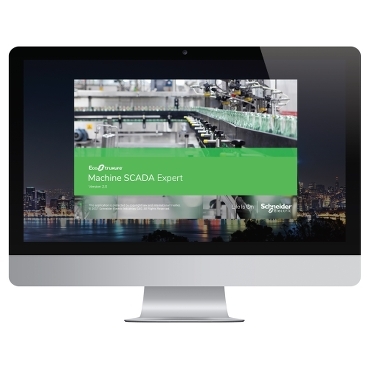
EcoStruxure™ Machine SCADA Expert

Features

Maximum value and efficiency with EcoStruxure Machine SCADA Expert software:
  • Save time building applications with ready-to-use PackML and OEE templates
  • Automatically generate reports compliant with CFR21
  • Track your data and understand your performance with the embedded EcoStruxure Machine SCADA Expert historian and OEE templates
  • Get peace of mind and save time and resources with our single point of contact for HW/SW/OS support
  • Access SCADA-level software, with all its benefits, at a competitive price, and get alarms by email
  • Confidently maintain your machine with long-term hardware supply and availability
  • Pay only for what you need with our application size-based license pricing
Connectivity and data management
  • Realize the power of the IoT with EcoStruxure Machine SCADA Expert’s extensive IT and OT driver library and data management capabilities (connection between ERP, MES, third-party historians, and the plant floor)
  • Includes 250+ native communication drivers
  • Native OPC interface, including OPC UA, OPC DA, OPC XML, and OPC .NET
  • With EcoStruxure Machine SCADA Expert Mobile Access, you can use your tablet or smartphone to remotely connect
  • Includes OPC Factory Server (OFS)


Schneider Electric developed EcoStruxure as a suite of tools and services to help users implement IoT. It simplifies collection of data from intelligent devices around their organisation. Notably, it does this using standard communications protocols. The data is then analysed either locally using Edge Control or remotely in the cloud to provide the user with critical insights to improve their business.

A range of software modules is available to simplify collecting data from a wide range of business functions and activities. As a result, they address the challenge of implementing IoT solutions in a seamless, cost-effectively and in a scalable manner.

INTERNET OF THINGS

The Internet of Things (IoT) is the inter-networking of physical devices to collect and exchange data via internet protocol (IP). The power and potential value of IoT emerges when it connects with five major technology transformations, of: mobility, cloud, sensing, analytics and cyber-security.

Specifically, these are accelerating the capacity to converge OT and IT systems. They change data into meaningful actionable intelligence for better business decisions. EcoStruxure combines the worlds of energy, automation, and software to make IoT a reality for organisations of all sizes.

WHAT IS ECOSTRUXURE?

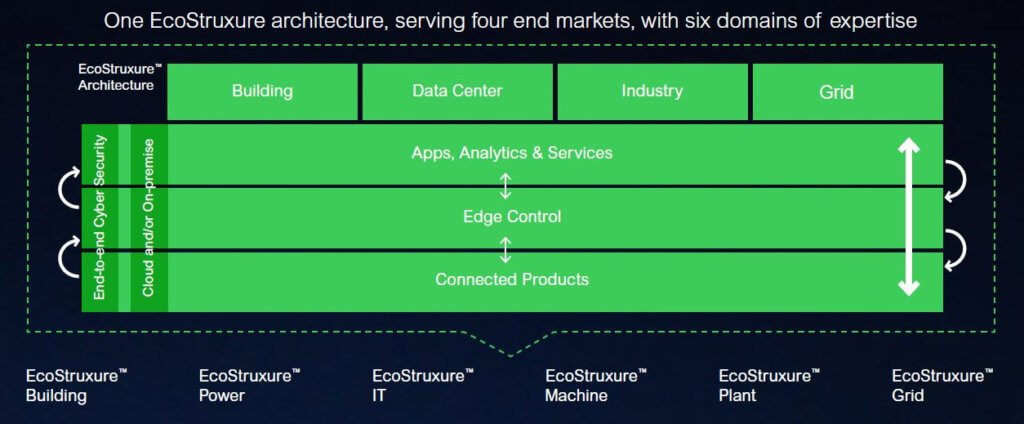
EcoStruxure is a single, open IoT systems to help organisations compete in the modern digital economy. In this case, it supports four markets where Schneider Electric has years of expertise and experience. EcoStruxure’s offers individual customised architectures for each of: Building, Data Centre, Industry, and Grid.

Interoperability is imperative to supporting the diverse hardware and systems in four industries. EcoStruxure enables a breadth of agnostic applications, analytics & services for seamless enterprise integration. Moreover, these provide support for safety, reliability, efficiency, sustainability and connectivity across their business.

EcoStruxure supports the four core markets with six sub-domains of expertise: Power; IT; Building; Machine; Plant, and Grid. Using its plug-and-play, open, interoperable architecture delivers proven connectivity for all levels of the organisation.

THE ECOSTRUXURE PLATFORM

Developed with partners Microsoft, Intel and others as an open ecosystem, the EcoStruxure platform is the technology backbone of the EcoStruxure architecture. It provides the fundamental set of technologies connecting three layers of innovation in IoT-enabled solutions for bridging the IT/OT gap. As a result, the EcoStruxure technology platform enables scalable design and operation of connected systems with best-in-class cyber-security built around three core capabilities.

Ecostruxure


Core capabilities

Firstly, for connecting everything from shop floor to top floor, devices with embedded intelligence    support better decision-making throughout operations. Schneider Electric’s IoT-enabled best-in-classconnected products include breakers, variable speed drives, sensors, and more.
 
Secondly, the Edge Control layer. This provides the critical ability to manage operations on-premise as well as from the cloud, depending on the business needs. It includes connecting control platforms with remote access, advanced automation and operator capabilities. Local control and firewall protection maximises the benefits especially for mission-critical applications.
 
Thirdly, interoperability. It is imperative to supporting the diverse hardware and systems in building, data centre, industry, and grid end markets. EcoStruxure enables extensive agnostic applications, analytics & services on open IP protocols. These provide for seamless integration with any hardware, system, or  control.

BENEFITS

By bridging IT and OT, EcoStruxure software allows customers to maximise the value of their business data. Specifically, it helps translate the data into actionable intelligence and better business decisions. As a result of bringing together energy, automation, and software, EcoStruxure accelerates making IoT a   reality.
 
It enables Schneider, its partners, and end-user customers to develop scalable and converged IT/OT    solutions. These maximise energy efficiency and sustainability through smarter systems and real-time, data-driven decisions. Furthermore, it optimises asset availability and performance through predictive  analytics and proactive maintenance.
 
EcoStruxure is the culmination of the company’s decades long industry leadership. It has been a multi-billion-dollar investment in R&D and acquisitions covering several years. Thus far, deployment exceeds 450,000 installations, with the support of 9,000 system integrators, and connected devices now exceed a billion devices.

ECOSTRUXURE FOR INDUSTRY


For industrial customers, EcoStruxure helps them unlock the potential of digitisation and IIoT: it speeds-up open standards-based development, offering more flexible alternatives to today’s models. Finally it addresses organisations with multiple and disparate systems within a process, and the complex and significant engineering issues to leverage IIoT and Industry 4.0.


EcoStruxure OperatorTerminal ExpertV3.1

PART1
PART2
PART3
PART4
PART5
PART6
PART7
PART8


EcoStruxureTM Operator Terminal Expert

EcoStruxure™ Operator Terminal Expert

Touchscreen configuration software with the latest UI design and gestures

EcoStruxure Operator Terminal Expert™ (formerly known as Vijeo XD) configuration software enables you to create and edit application Magelis HMIs and iPCs screens

Ecostruxure Operator Terminal Expert Reinvents (6.7 MB) 320 Kbps ...


Features

Common Features
  • Variables - named spaces in memory for storing data. Create all the variables you need, and then associate variables with switches, lamps, data displays, and other objects on the screen.
  • Alarm - The Alarm Summary can display information such as: alarm message, type of alarm, and date and time when the alarm was reported or restored.
  • Operation Logs - Maintaining a log of operations on the panel is useful in analyzing the root cause of problems, such as operations executed before an error is detected. User Management can be used to identify the person operating the system.
  • Data Logging and Trend Graph - Data logging collects and stores values in device addresses associated with variables
  • Recipes - Recipe enables overwriting of device address values. Change device address values by transferring the recipe created during development.
  • Security - The Security feature secures objects from unauthorized users. Log in with a valid user name and password to access secured objects. Auto-logout supported.
  • Converter - Change the value of a variable from the defined unit, range, scale, and expression
  • Gestures - Touch gesture is an action that involves moving a finger in a particular manner on the screen to perform specific operations, associated with objects on the screen.
-

Benefits

EcoStruxure Operator Terminal Expert software helps designers and operators to maximize efficiency through modern functionalities and user-friendly features.

Operate intuitively
  • Multi-touch zoom in/zoom out, slide, pinch, and stretch options similar to smartphones for enhanced user experience
  • With special navigation features like scrolling panel and zoom in/zoom out panel, more information can be accessed and   viewed in a single page
  • Information-rich objects providing easy and direct access to device information and database
  • Improved efficiency for HMI operators with clear design such as Vector graphics, fonts, and new object properties

Reduce time to market
  • Minimize design time with pre-defined navigation and easy to locate tab management
  • Fast customization and product differentiation can be achieved by using prepared Themes and Color-set
  • Scripting made easy for everyone, just drag and drop the target objects to canvas

Improved visualization  
  • High image quality and usability for modern look and feel

EcoStruxure Operator Terminal Expert provides integral visibility through the EcoStruxure architecture:
  • Data Dictionary support for automatic updates between Schneider Electric PLCs and the HMI database
  • No need to manually change the HMI project

Symbol sharing together with EcoStruxure Machine Expert (formerly SoMachine) and Unity PLCs:
  • Supported file formats: smbp / xml / xvm / xsy
  • Also supporting unallocated variables

EcoStruxure Secure Connect Advisor (formerly Vijeo Connect)
  • Secure access to the HMI over the internet for maintenance, control and monitoring

EcoStruxure Augmented Operator Advisor (formerly Vijeo 360)
  • Augmented reality for instant diagnosis and contactless maintenance, for increased efficiency and lower costss  

Applications


  • Simple or complex machine builders (automotive, electronic components, pharmaceutical products, chemical)
  • Tertiary industry and infrastructure: building, food and beverage, water and waste treatment


  • My AOA Presentation_ by Mark I on Prezi Next


    UnityProXL V13 TRIAL+PATCH

    UnityProXL V13 TRIAL+PATCH


    PART1
    PART2
    PART3
    PART4
    PART5
    PART6
    PART7
    PART9
    http://raboninco.com/FPkW


    SN : 21080503890
    UNYSPUETUV1X


    The problem is the license code UNYSPUETUV1X.
    This is a part of the licensing program for XL v13

    Code:
    UNYSPUETUV1X     Trial one user. CANNOT BE LATER CONVERTED
    UNYSPUEFUV1X            1 USER
    UNYSPUEFGV1X            3 USERS
    UNYSPUEFFV1X           100 USERS


    Then just using the serial number above provided and for instance the license code UNYSPUEFUV1X will do the job. Normal installation with 21 days left to register.
    If you are already blocked with the demo version, just full uninstall, re-install with the right license code and voilà.


    1. Reinstall ..do not restart..
    2. Run Patch..and Click Patch ...point to the PrvDisk.exe as in picture above
    3. Click then GEN and Copy Registration..
    4. Open PrvDisk and Click Options->About...
    5. Put any name...and company..but put Registration Code copied before...
    6. Enjoy...


    UnityPro V13 PATCH
    UnityPro_Help


    UnityPro V13.1(Official Release)

    PART1
    PART2
    PART3
    PART4
    PART5
    PART6
    PART7
    PART8
    PART9
    PART10
    PART11


    SN :21080503890
    UNYSPUETUV1X

    Use to setup Trial Version for V11, V12, V13
    - Part Number: UNYSPUEZTV1X
    - Serial Number: 13345618595
    Or
    - Part Number: UNYSPUETUV1X
    - Serial Number: 21080503890

    UNYSPUEZTV1X Unity PRO XL, 10 lis, oppg PL7/Concept
    13345618595
    Password: unity50_1


    UnityPro V12 UPGRADE

    PART1
    PART2
    PART3
    PART4
    PART5


    UnityPro XL V12

    PART1
    PART2
    PART3
    PART4
    PART6


    UnityPro V11 UPGRADE

    PART1
    PART2
    PART3
    PART4
    PART5
    PART6
    PART7
    PART8


    UnityProXL V4.0, V5.0, V6.0, V7.0


    UnityProXL V4.0
    PART1
    PART2
    PART3
    PART4
    PART5
    PART6
    PART7

    UnityPro XL 5.0

    UnityPro XL V6.0
    PART1
    PART2
    PART3
    PART4
    PART5
    PART6
    PART7
    PART8
    PART9
    PART10
    PART11
    PART12
    PART13

    UnityProXL V7.0+CRACK
    PART1
    PART2
    PART3
    PART4
    PART5
    PART6
    PART7
    PART8


    Unity Pro Overview

    • Schneider Unity Pro (V13) is available the software packages: Small (S), Large (L), X Large (XL) and X Large Safety (XLS). The only difference between sizes S, L, XL, XLS is supported controller references (Please read the manual).
    • UP supports the following hardware platforms (with Version V13): Modicon M340, Modicon M580, Quantum, Momentum, Premium and Atrium.

    • The software provides the following programming languages for creating the user program: Function Block Diagram FBD; Ladder Diagram (LD) language; Instruction List IL; Structured Text ST; Sequential Control SFC; Ladder Logic 984 (LL984). All of these programming languages can be used together in the same project. And all these languages (except LL984) conform to IEC 61131-3.
    • Block Libraries
      The blocks that are included in the delivery of Unity Pro extensive block libraries extend from blocks for simple boolean operations, through blocks for strings and array operations to blocks for controlling complex control loops. For a better overview, the different blocks are arranged in libraries, which are then broken down into families. The blocks can be used in the programming languages FBD, LD, IL, and ST.
    • Elements of a Program – A program can be constructed from:
        •  A master task (MAST)
        • A FAST task (not available for Momentum)
        • One to 4 AUX tasks (not available for Modicon M340 and Momentum)
        • Program Units which are assigned one of the defined tasks (available for Modicon M580 and Modicon M340)
        • Sections, which are assigned one of the defined tasks
        • Sections for processing time controlled events (Timerx, not available for Momentum)
        • The sections for processing hardware controlled events (EVTx, not available for Momentum)
        • Subroutine sections (SR)
    • For more detail, you might read the manual.

    Schneider PLC Software – UnityPro V13 System Requirements

    • The Unity-Pro V13 XL (or S, L, XLS) software requires one of the following operating systems to be present on the terminal:
        • Microsoft Windows 7 Professional edition 32/64 bits SP1
        • Microsoft Windows 10 Professional edition 32/64 bits
        • Windows Server 2016
    • Minimum and recommended terminal configuration with Windows 7 Professional Edition 32/64 bits SP1:
        • System Pentium processor 2.4 GHz or higher; recommended: 3.0 GHz.
        • RAM 2 GB; recommended: 3 -4 GB.
        • Hard disk space 8 GB including the memory space for the software installation, temporary space for execution and space for saving applications; recommended: 20 GB.
        • Display SVGA 1024×768 or higher resolution monitor with high color 24 bits.
        • A Microsoft mouse or compatible pointing device., web Access, USB port on the computer …
    • Windows 10 64bits is recommended for projects using DTMs (example: projects using Modicon M580 controller).


    Why Unity Pro simulator is not working?

    Published date: 28 February 2017

    One possible cause is that the port 502 is already in use by another equipment.
    The PLC simulator is TCP/IP server on the Schneider port 502.
    The quickest way to see which ports are used is to open a DOS windows and to run netstat -a then you will see if port 502 is used or not.


    To have more information on the equipment which use the port you can use a freeware like “CurrPorts” Copyright © 2004-2011 Nirsofer, downloadable from http://www.nirsoft.net.
    So If another equipment is using this port 502 you will have to configure the equipment using this port to an other port to keep it free for Unity Pro. Unity Pro simulator can not use an other port.


    So If another equipment is using this port 502 you will have to configure the equipment using this port to an other port to keep it free for Unity Pro. Unity Pro simulator can not use an other port.
    See also
    https://control.com/thread/1273524691#1273524691
    https://control.com/thread/1026216045
    https://control.com/thread/1287459348